Saturday, August 23, 2014

Semi-revisit of DP55WB Network Issues

I had spoken to a friend of mine about BIOS flashing at one point and he was very experienced at that.  Some time back, I had an article over the issues my DP55WB motherboard had and showed him the downloads.  He was kind enough to clear things up with me over what the downloads were.

The WB0336P.BIO file is used to restore in case the flashing goes wrong.  The WBIBX10J.86A.0336.BI.ZIP is a zip file that contains the flashing tool for DOS.  You would have to use something like unetbootin to build a FreeDOS boot disk.  Then, run the executable to flash the BIOS.  The last one WBIBX10J.86A.0336.EB.EXE is a Windows executable to update the BIOS directly.

As usual, it's important to get the motherboard right and make sure the power doesn't go out during flashing.  I'm not going to update my BIOS but this is good information to post here in the mean time.

Sunday, August 10, 2014

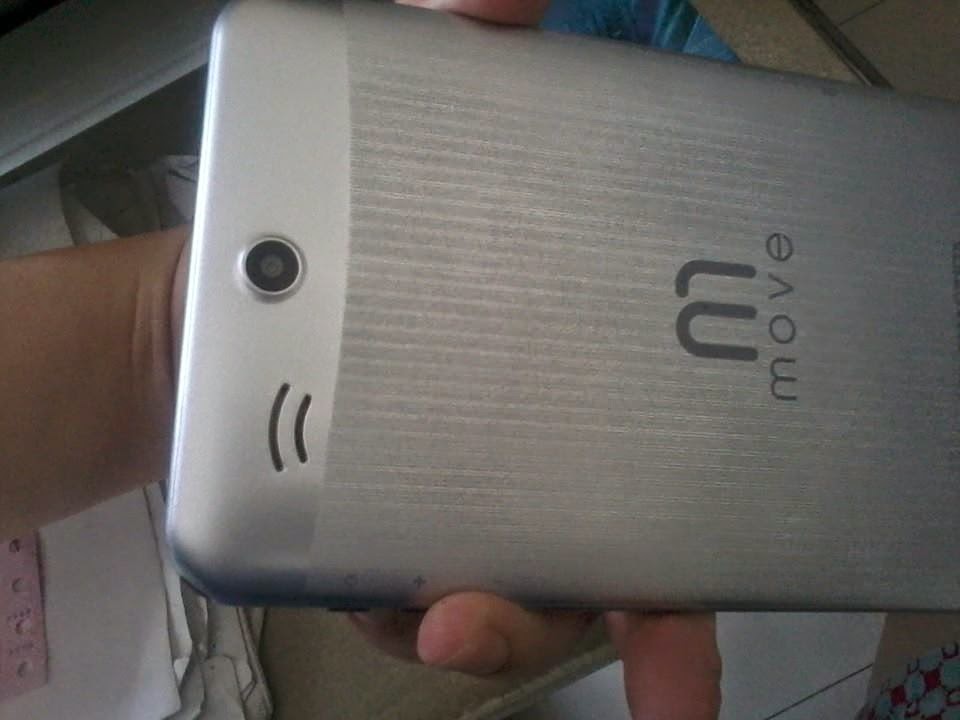
MoveTab MAQ71DX


So, I just got another one of these OEM tablets from MyView.  It's a bit pricier than the usual OEMs, but it's a dual core tablet which made me a bit leery considering the bad experience I got from the Thomson M-6. I checked the battery rating on this one and it's the same as the Eken which was 3000 mAh.  I gave the tablet a test run and it seemed fine and had Google Play Store so there was not much to complain about.  I double checked the Thomson battery rating and it was 2000 mAh which should explain the completely horrible battery life of that one.

The MoveTab has an 8 GB internal storage partitioned with around 1 GB for installation and the rest for data storage.  It seemed that several of its preinstalled stuff can actually be uninstalled which is a nice thing.  This seems to be a pretty new brand so it may get tricky down the road when the company vanishes, but as long as you get from a reputable store, they will take care of your issues.  Other than that, no real complaints.

GPU is PowerVR SGX531 and the CPU is MTK8377 ARM Cortex A9 which is a MediaTek SoC.  So far, works well with decent wifi and good touch screen functionality.  As an additional note, the website reports it as 2500 mAh but the box I bought had said it was 3000 mAh.  Please do not settle for anything less than that.

Monday, July 28, 2014

Wine-ing About Everything

So, the past few weeks of using Wine was interesting to say the least.  I had not realized how big this post was going to be until it was all done, so I'm putting this all after the jump!

Saturday, July 5, 2014

Mass Effect 2 and Screenshots

I wrapped up Mass Effect 1 yesterday and it was an interesting journey after playing Mass Effect 3 so many times and knowing much of the reveals.  I was going to move to playing Mass Effect 2 on my Linux box through Wine, but for some reason, it just wouldn't work.  I suspect it's because of Origin's activation thing that is tripping up, but after fighting with this for hours, I decided to install it right back on my old Vista laptop.

The next issue I had to fight with was the screenshot taking.  I used this forum thread to help.  To make things brief, what you need is to download the ME2CoalescedEditor and point it to your installed Mass Effect 2 path.  Then go to the BindingsManager, select the key to use (I used F12) at the bottom left panel, then select "Add New".  Type in 'Shot' (capitalizations don't matter, I think) on the command so it looks like:

Bindings=( Name="F12",Command="Shot")

Then, look for the BIOInput tab on the left side tabs and the following trees:
  • SFXGameNodeConversation
  • SFXGameNodeCinematics
Right click and then select Add Settings, then new single setting.  Paste the command above and then exit the editor (it automatically saves the changes).

There are two screenshot folders in Mass Effect 2.  The Bioware/Mass Effect 2/ScreenShots/ is always empty.  All screenshots go to Bioware/Mass Effect 2/BIOGame/Screenshots/.

Friday, July 4, 2014

Batch processing with GIMP

I found a useful article on how to get GIMP to perform tasks on files.  Have a look at this.  Be sure to apt-get install gimp-plugin-registry.

Origin on Wine and the Preparing Download

Well, I've gotten stuck on Wine and Origin's Preparing Download and had forgotten to patch Qt5Network.dll that had been overwritten by several Origin updates.  I'm fortunate that the patch is still in my Origin install folder so I backed up the new dll and re-ran the patch to fix it.  Details on this issue are on this Wine Bug thread.

Mass Effect 1 was pretty good and I finished it entirely in Wine/Linux.  Awesome!

Sunday, June 22, 2014

Windows Vista Disk Thrashing

I've tolerated Vista's insane disk thrashing forever now and usually the system would lock up with disk activity once in a session.  Having used Vista more often now, I decided to have a look at why in the world is this happening.  I have reduced it and here's the three basic culprit:
  1. Windows Search Indexing - Go to the Services and disable this service from starting up.
  2. Windows SuperFetch - This is also in the Services
  3. Automatic Disk Defragmenting - Go to Accessories, System Tools and then Disk Defragmenter.  Then, disable the Run on a schedule option.
Of the three, disk defragmenter was the major culprit of locking up.  So, if you're suffering, disable this one first.