
After my excursion with the wifi, I went to AMD's site and downloaded Catalyst 14.9 for Linux. I also had to do more apt-getting for fglrx.
$ sudo apt-get install build-essential cdbs dh-make dkms execstack dh-modaliases linux-headers-generic fakeroot xserver-xorg-dev lib32gcc1
Then follow the steps here.
Sunday, October 12, 2014

Going back to Ubuntu 12.10
So, installing Ubuntu 12.10 on my HP laptop came with some unforeseen issues, but I think they are mostly sorted at this point.
After install, I had to go to /etc/apt/sources.lst to change all references to old-releases.ubuntu.com which is to be expected from an OS that is no longer supported. I also decided to grab all the updates which took a bit of time to do. It asked me to reboot which turned out to be a bad decision as I forgot to install the kernel headers and source which meant I had no wifi when I rebooted. Why on earth did Ubuntu not auto-install the kernel source when these dkms dependent packages need them is beyond me.
So, to solve the lack of wifi from my Broadcom Wifi Card (4313, if I'm not mistaken), I had to boot back to the old kernel. Right after the laptop's POST and just before booting Ubuntu I hit the shift key to get the grub menu. The old kernel is at the advance option. This allowed me to get my wifi back. Then, I did some serious apt-getting.
$ sudo apt-get install linux linux-headers-generic kernel-package
After that, I loaded Software Sources and disabled and re-enabled the Broadcom drivers which did some apt-getting and dkms work on its own. Reboot after and voila, wifi on a new kernel. Now for fglrx.
Fedora Core 20 and Virtualbox
I liked Fedora Core 20's interface. I think it's right up there with Ubuntu's unity. Unfortunately, it seems as my HP laptop cannot really run what I need to run from my backed up Virtualbox install. So, I will be purging this and installing Ubuntu 12.10 which was the last Ubuntu release that was very problem free on this laptop. Anyway, this blog post details the issues I came across while getting my backed up Virtualbox image to work. More after the jump!
Monday, October 6, 2014
Backing Up and Restoring Oracle dbf
I had a brief excursion into installing Oracle and playing around with dbf files and figured to understand how to move the actual dbf file as a backup of the database and then restore it in a completely new installation. These are notes I made using default parameters on Oracle and I'm not crazy enough to go into detail on what the hundreds of customized Oracle installs are available out there.
An important step before copying is to shutdown your Oracle instance and database. So use your sysdba privileges and shut it down. Then, basically, I copied the entire oradata folder from my ORACLE_BASE path into an external hard drive. Along with that, I also copied the flash_recovery_area which contained the RMAN information as well as the revision of the database. NOTE: the database from oradata must match the control.ctl file from flash_recovery_area. If you startup the database again, the ctl file will be different and the backup won't work.
After reinstalling Oracle, I moved the oradata and flash_recovery_area from the fresh install into another folder (as precaution) and copied over the ones from my hard drive. Then, I did:
SQL> startup mount;
SQL> recover database until cancel;
SQL> alter databse open resetlogs;
Then you can log into SQL*Plus and verify that the data is intact. Afterwards, shut the database down. This seems to take a long while to do but it will finish eventually.
Saturday, September 27, 2014
Mass Effect 3: Multiplayer Error
I had one nasty instance where when I loaded the multiplayer on Mass Effect 3 PC version, the game froze when switching character classes. After I forcibly killed the process and restarted the game, everytime I went to multiplayer, the game would load forever. I tried to repair the install but that didn't work.
The only fix that I could do was pull out my backup install from an external hard disk and replace the installed copy with that backup. I was then able to fire up the game and play multiplayer. Note that the game did crash once after this replacement when selecting multiplayer. Restarting the game went into multiplayer just fine though.
Saturday, August 23, 2014
Semi-revisit of DP55WB Network Issues
I had spoken to a friend of mine about BIOS flashing at one point and he was very experienced at that. Some time back, I had an article over the issues my DP55WB motherboard had and showed him the downloads. He was kind enough to clear things up with me over what the downloads were.
The WB0336P.BIO file is used to restore in case the flashing goes wrong. The WBIBX10J.86A.0336.BI.ZIP is a zip file that contains the flashing tool for DOS. You would have to use something like unetbootin to build a FreeDOS boot disk. Then, run the executable to flash the BIOS. The last one WBIBX10J.86A.0336.EB.EXE is a Windows executable to update the BIOS directly.
As usual, it's important to get the motherboard right and make sure the power doesn't go out during flashing. I'm not going to update my BIOS but this is good information to post here in the mean time.
Sunday, August 10, 2014
MoveTab MAQ71DX
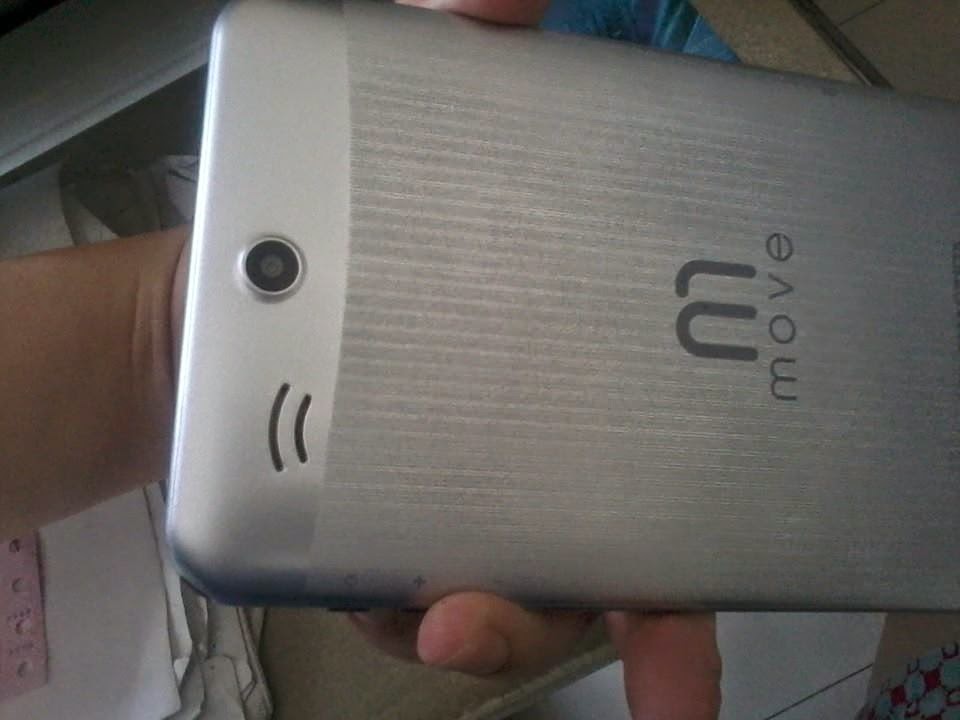
So, I just got another one of these OEM tablets from MyView. It's a bit pricier than the usual OEMs, but it's a dual core tablet which made me a bit leery considering the bad experience I got from the Thomson M-6. I checked the battery rating on this one and it's the same as the Eken which was 3000 mAh. I gave the tablet a test run and it seemed fine and had Google Play Store so there was not much to complain about. I double checked the Thomson battery rating and it was 2000 mAh which should explain the completely horrible battery life of that one.
The MoveTab has an 8 GB internal storage partitioned with around 1 GB for installation and the rest for data storage. It seemed that several of its preinstalled stuff can actually be uninstalled which is a nice thing. This seems to be a pretty new brand so it may get tricky down the road when the company vanishes, but as long as you get from a reputable store, they will take care of your issues. Other than that, no real complaints.
GPU is PowerVR SGX531 and the CPU is MTK8377 ARM Cortex A9 which is a MediaTek SoC. So far, works well with decent wifi and good touch screen functionality. As an additional note, the website reports it as 2500 mAh but the box I bought had said it was 3000 mAh. Please do not settle for anything less than that.
Subscribe to:
Posts (Atom)


